
Download AudioBot – Text to Ultra-Realistic Voice Converter, AI Voice Generator, Multilingual TTS
Overview – What is AudioBot and Who Can Benefit?
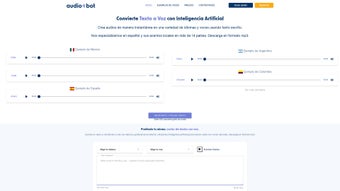
AudioBot is a cloud‑based, subscription‑driven AI voice generator that transforms plain text into ultra‑realistic speech within seconds. Powered by deep‑learning models, the platform offers more than 500 professional voices spanning a wide range of languages and regional accents. While it supports global languages, AudioBot places special emphasis on Spanish, delivering over 14 distinct regional accents—from Mexican to Argentine—to ensure culturally accurate narration. Whether you are a video editor, e‑learning developer, podcaster, or a person with accessibility needs, AudioBot provides a fast, secure, and user‑friendly way to create high‑quality audio content without the hassle of hiring voice talent.
The service operates on a straightforward subscription model, giving users access to unlimited text‑to‑speech conversions, batch audio file exports, and built‑in language translation. Because everything runs in the browser, there is no need to install heavy software; you simply log in, paste your script, select a voice, and download the resulting MP3 or WAV file. The platform’s commitment to privacy, GDPR compliance, and end‑to‑end encryption makes it a trustworthy choice for professionals handling sensitive material.
AudioBot’s core value proposition lies in its ability to combine realism with speed. Traditional TTS engines often sound robotic, but AudioBot’s neural synthesis captures subtle intonations, pauses, and emotions, resulting in speech that feels genuinely human. This makes it ideal for applications such as marketing videos, audiobooks, interactive voice response (IVR) systems, and language‑learning tools. In the sections that follow, we’ll explore the standout features, walk through the installation and usage process, examine system compatibility, and weigh the pros and cons to help you decide if AudioBot is the right voice‑generation tool for your workflow.
Key Features That Set AudioBot Apart
- Ultra‑Realistic Voice Library: Over 500 AI‑crafted voices, including 14+ Spanish regional accents, male and female tones, and customizable speech styles.
- Multilingual Support & Translation: Convert text in more than 30 languages and let the engine translate and synthesize the output in a different language automatically.
- Instant Text‑to‑Speech Conversion: Generate audio files in seconds, even for lengthy scripts, thanks to high‑performance cloud processing.
- Batch Processing & Export Options: Upload multiple text files, apply the same voice settings, and download all results as MP3, WAV, or OGG formats.
- Secure, GDPR‑Compliant Platform: End‑to‑end encryption ensures that your content stays private and your data is never shared with third parties.
- API Access for Developers: Integrate AudioBot’s TTS engine into your own applications, websites, or automated workflows via RESTful API.
- Custom Pronunciation Dictionary: Fine‑tune how specific words or brand names are pronounced, eliminating mispronunciations common in generic TTS services.
- Voice‑Emotion Controls: Adjust parameters such as excitement, calmness, or urgency to match the mood of your script.
- Cloud‑Based Editing Dashboard: Edit scripts, preview audio, and manage your voice library directly from a responsive web interface.
- Regular Updates & New Voices: The development team releases fresh voice packs and feature enhancements monthly, keeping the platform ahead of the competition.
These features collectively make AudioBot a comprehensive solution for anyone who needs high‑quality synthetic speech without compromising on realism or speed. The platform’s flexibility—ranging from a simple one‑click conversion to deep API integration—means it can serve both casual users and enterprise‑level projects. Moreover, the focus on Spanish regional accents fills a notable gap in the market, where many TTS tools offer only generic Spanish voices. Whether you are creating a multilingual marketing campaign or producing an educational series, AudioBot’s feature set is designed to reduce production time, lower costs, and maintain a professional audio standard.
Installation, Usage & System Compatibility
Getting Started – No Download Required
AudioBot is a web‑app, which means you don’t need to download any installer or worry about operating‑system dependencies. Simply visit https://audiobot.io, create a free trial account, and you’ll be taken to the main dashboard. The interface is divided into three panels: a text editor on the left, voice selection in the center, and a preview player on the right. After typing or pasting your script, choose a voice from the dropdown, adjust any emotion sliders, and click “Generate.” Within a few seconds, a waveform appears, and you can listen to the result or download it directly.
Step‑by‑Step Workflow
- Sign Up / Log In: Provide an email address, set a password, and confirm your subscription plan (monthly or annual). A free trial grants 10 minutes of generated audio.
- Enter Text: Paste your script, or upload a .txt/.docx file for bulk conversion.
- Select Voice & Settings: Choose from the feature list, set speed, pitch, and emotion levels.
- Generate & Preview: Click “Generate” and wait for the cloud engine to synthesize the audio. Use the built‑in player to ensure quality.
- Download or Export: Choose MP3, WAV, or OGG, then click “Download.” For batch jobs, select “Export All” to receive a ZIP archive.
- API Integration (Optional): Retrieve your API key from the “Developer” tab, follow the REST documentation, and embed TTS functionality into your own applications.
Operating System Compatibility
Because AudioBot runs entirely in the browser, it is compatible with any modern operating system that supports Chrome, Firefox, Safari, or Edge. This includes Windows 10/11, macOS Ventura and later, Linux distributions with a recent browser, as well as mobile platforms such as Android 9+ and iOS 14+. The responsive design ensures a seamless experience on tablets and smartphones, allowing creators to generate voiceovers on the go.
For users who prefer a desktop‑only environment, AudioBot also offers a lightweight Electron wrapper that can be installed on Windows, macOS, and Linux. The wrapper provides offline caching of voice models (subject to subscription level) and integrates with the OS clipboard for quick text pasting. However, the core AI processing still occurs on AudioBot’s secure servers, guaranteeing consistent performance regardless of local hardware.
Overall, the installation process is virtually frictionless, and the cross‑platform compatibility means you can switch between devices without losing access to your projects or voice settings.
Pros, Cons & Frequently Asked Questions
Pros
- Ultra‑realistic voices that rival professional voice actors.
- Extensive Spanish regional accents – a unique market advantage.
- Instant cloud‑based processing – no heavy local hardware required.
- Multilingual support and built‑in translation for global projects.
- Secure, GDPR‑compliant platform with end‑to‑end encryption.
- API access for developers and batch processing for large workloads.
- Regular updates add new voices and features.
Cons
- Subscription model may be pricey for occasional users.
- Dependence on internet connection; offline use is limited.
- Free trial caps at 10 minutes of audio, which may be insufficient for testing.
- Advanced voice‑emotion controls have a learning curve.
- Audio file size limits on the free tier (max 5 MB per export).
FAQ – Answers You Need Before You Subscribe
How secure is my data on AudioBot?
AudioBot uses TLS 1.3 encryption for all data in transit and stores content on GDPR‑compliant servers. Uploaded scripts are automatically deleted after 30 days unless you opt to keep them in your personal library.
Can I use AudioBot for commercial projects?
Yes. All paid subscription plans include a commercial‑use license, allowing you to incorporate generated audio into videos, ads, apps, and other revenue‑generating content.
What file formats does AudioBot export?
You can download audio as MP3 (256 kbps default), WAV (lossless), or OGG. Batch exports are provided as a ZIP archive containing each file in the selected format.
Is there an API, and how is it priced?
AudioBot offers a RESTful API with token‑based authentication. API usage is included in the Pro and Enterprise plans; additional pay‑as‑you‑go credits are available for high‑volume developers.
Can I customize pronunciation for brand names?
Yes. The platform includes a custom dictionary where you can define phonetic spellings for specific words, ensuring consistent pronunciation across all generated files.
Review Summary
Overall Rating: 4.6/5
AudioBot delivers a powerful combination of realism, speed, and multilingual flexibility that makes it a top contender in the AI voice‑generation market. While the subscription cost may deter occasional hobbyists, professionals and enterprises will find the value outweighs the price.
Conclusion – Should You Download AudioBot?
If you need a fast, reliable, and ultra‑realistic text‑to‑speech solution that supports a wide array of languages and offers a deep library of Spanish regional accents, AudioBot is a compelling choice. Its cloud‑native architecture eliminates the need for heavy local installations, while the API and batch processing features cater to both creators and developers. The secure, GDPR‑compliant environment ensures that sensitive scripts stay private, and the regular addition of new voices keeps the platform fresh.
Potential buyers should weigh the subscription pricing against their expected usage. For frequent content producers—such as video marketers, e‑learning authors, or accessibility advocates—the time saved and the professional quality of the output justify the cost. On the other hand, casual users who only need occasional voiceovers may find the free trial’s 10‑minute limit insufficient and might consider alternative free TTS tools.
Ready to experience lifelike synthetic speech? Sign up for a free trial today and start generating high‑quality audio in seconds. With its robust feature set and cross‑platform compatibility, AudioBot stands out as a premier AI voice generator for anyone serious about turning text into compelling sound.



.png)



